

- 온체인에 직접 저장되는 작은 비밀을 위한
uploadCDR/accessCDR - 오프체인에 저장되는 더 큰 암호화 파일을 위한
uploadFile/downloadFile
사전 요구 사항
- WASM이 초기화되고 클라이언트가 생성된 CDR SDK 설정 완료
온체인 vs 오프체인에서 실행되는 작업
비밀 암호화하기
아래 다이어그램은 온체인 비밀 흐름을 보여줍니다: 볼트를 할당하고, TDH2로 비밀을 로컬에서 암호화한 다음, 암호문을 볼트에 기록합니다.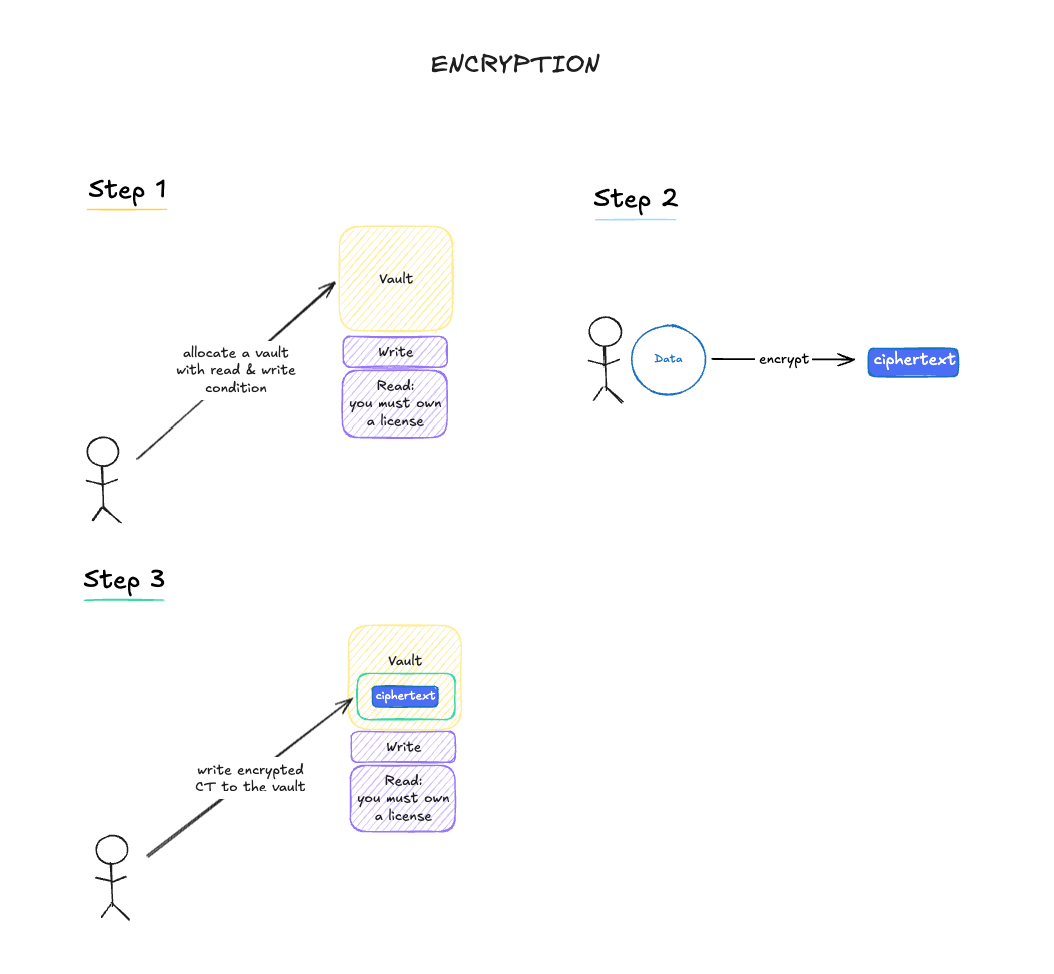
msg.sender가 구성된 조건 주소와 같으면 조건 검사를
건너뛰므로, 해당 지갑만이 볼트에 쓰거나 읽을 수 있습니다. 고수준 uploadCDR()
헬퍼는 조건 주소가 배포된 조건 컨트랙트를 가리키는지 검증하기 때문에, EOA
조건은 skipConditionValidation: true와 함께 저수준 allocate() 호출을 통해
구성됩니다.
어떤 EOA 주소든 쓰기 또는 읽기 조건으로 작동하며, 해당 EOA만이 매칭되는
동작을 수행할 수 있습니다. 한쪽만 게이팅하려면 해당 측에 지갑 주소를
설정하고 다른 측에 조건 컨트랙트(예:
LicenseReadCondition)를 설정하세요.
고수준 uploadCDR() 헬퍼는 양쪽 모두에 배포된 조건 컨트랙트가 있을 것을
기대하며 EOA 조건을 지원하지 않으므로, DATA Foundation 라이선스 게이트
읽기와 같은 패턴(IP Asset Vaults 참조)에는
헬퍼를 사용하고, 소유자 전용 EOA 조건에는 위에 표시된 저수준 allocate() +
write() 흐름을 사용하세요.트랜잭션의 값은 수수료와 정확히 동일해야 합니다.
dataKey는 기존 매개변수 이름입니다. encryptDataKey()에서는 단지
암호화 키뿐만 아니라 어떤 비밀 바이트든 될 수 있습니다.비밀 복호화하기
복호화는 온체인에서 읽기 요청을 제출하고, 검증자들로부터 부분 복호화를 수집한 다음, 클라이언트 측에서 조합하는 과정이 필요합니다.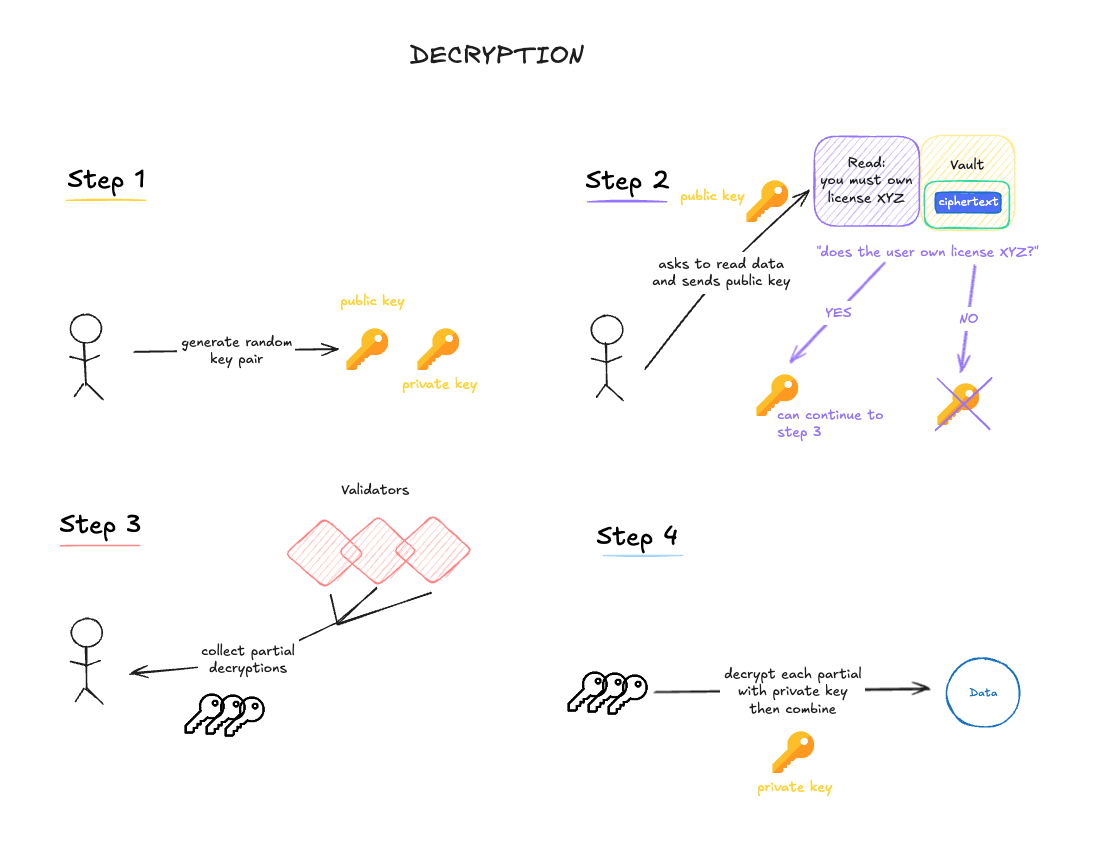
accessCDR()은 일회용 키 쌍을 자동으로 생성하고, 생략하면 globalPubKey를
자동으로 조회합니다. 임계값은 부분 복호화 버킷의 DKG 라운드에서 자동으로
파생됩니다.서버 측 요청의 타임아웃은 200블록이며, 이는 약 7분에 해당합니다. 이 타임아웃
내에 충분한 부분을 수집하지 못하면 다른 읽기 요청을 시도하세요.
고급: 수동 키 쌍 제어
고급: 수동 키 쌍 제어
파일 암호화 및 다운로드
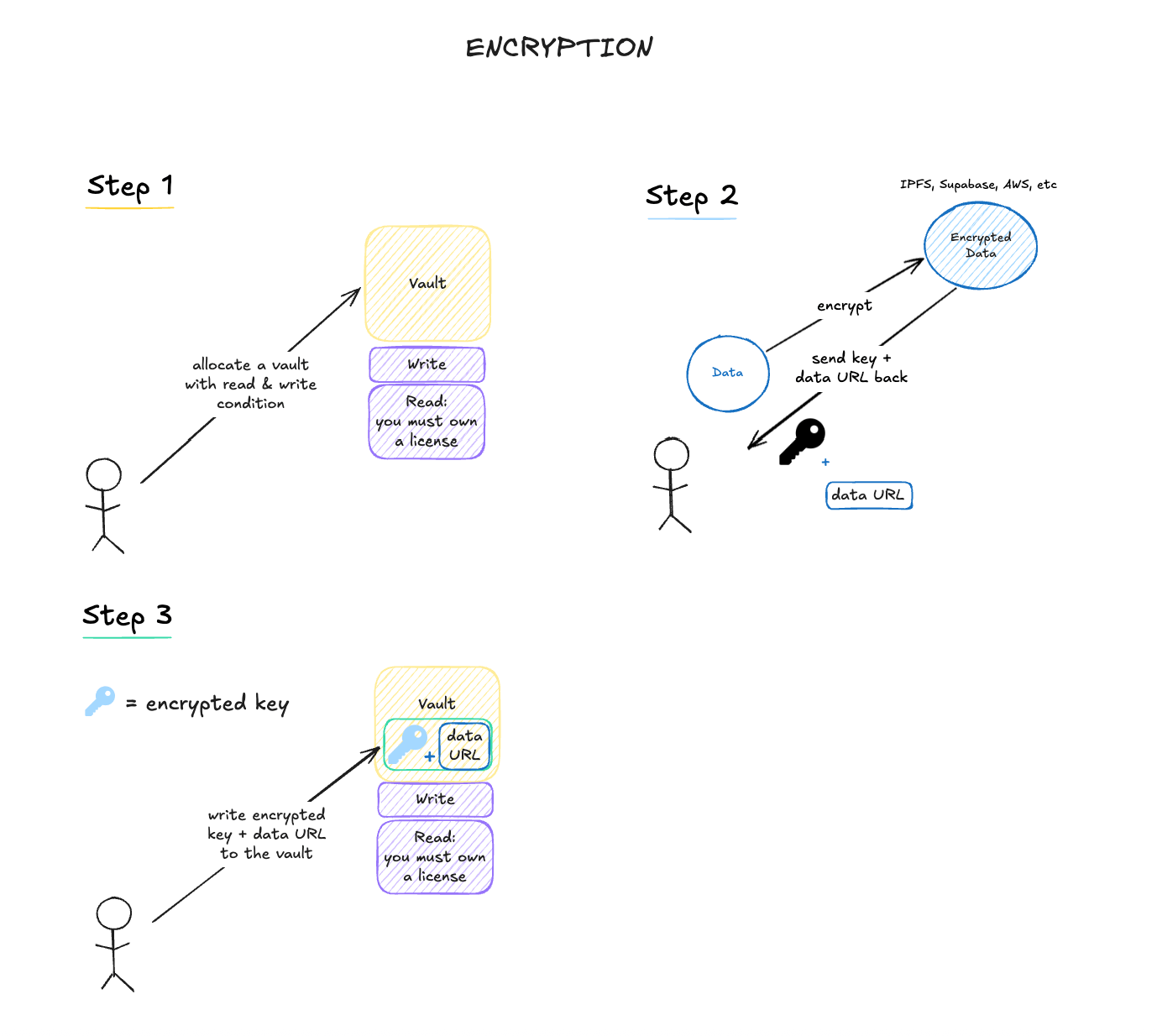
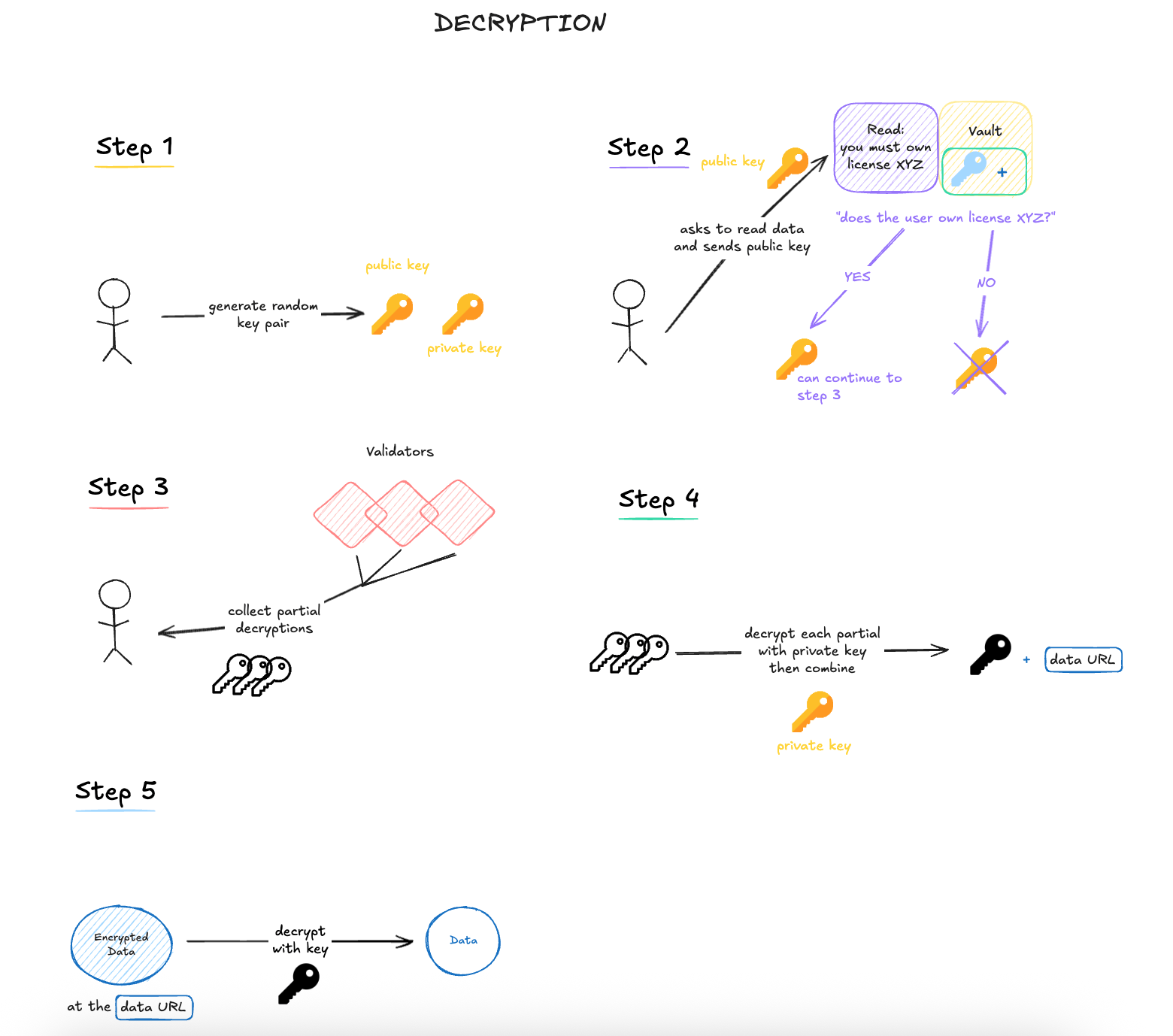
uploadFile() 헬퍼는 양쪽 모두에 배포된 조건 컨트랙트가 필요하므로, 아래
예제에서는 쓰기 측에 DATA Foundation의 OwnerWriteCondition을, 읽기 측에
LicenseReadCondition을 사용합니다. 라이선스 토큰 보유자는 파일을 복호화할 수
있습니다(엔드 투 엔드 라이선스 설정은 IP Asset Vaults
참조). 소유자 전용 파일 흐름의 경우, 지갑(EOA) 주소를 양쪽 조건 모두로 사용하여
앞서 표시된 저수준 단계를 복제하세요.
HeliaProvider는 현재 릴리스에서 Aeneid에서 완전히 테스트된 유일한 스토리지
백엔드이며, Node.js 22+가 필요합니다.uploadFile() 및 downloadFile()은 원시 파일 바이트로 작동합니다. 브라우저에서는
File 객체에서 시작하여 new Uint8Array(await file.arrayBuffer())로 변환하세요.스토리지 프로바이더
암호화된 파일 워크플로는 네 가지 스토리지 백엔드를 지원합니다:- 인-프로세스 IPFS를 위한
HeliaProvider. 개발을 위한 최고의 시작점이며 지금까지 Aeneid에서 완전히 테스트된 유일한 백엔드입니다. - 외부 IPFS HTTP API와 게이트웨이 URL을 위한
GatewayProvider. - Storacha /
web3.storage를 위한StorachaProvider. - Synapse를 통한 Filecoin 기반 스토리지를 위한
SynapseProvider.
HeliaProvider를 사용하는 경우 클래스 불일치를 피하기 위해 위와 같이
생성자에 CID.parse 함수를 전달하세요.단계별 가이드 (저수준)
프로세스에 대해 더 많은 제어가 필요한 경우 각 단계를 개별적으로 호출할 수 있습니다.이 스니펫들은 위 예제의 변수에서 계속됩니다:
walletClient, globalPubKey,
requesterPubKey, recipientPrivKey, dataKey.암호화 (저수준)
복호화 (저수준)
DKG 상태 조회
지갑이나 WASM 초기화 없이도 DKG 상태와 수수료를 조회할 수 있습니다:수수료 이해하기
각 CDR 작업에는 온체인 수수료가 있습니다:
수수료는 네이티브 토큰(wei)으로 지불되며 각 트랜잭션과 함께
msg.value로 전송됩니다.